featured
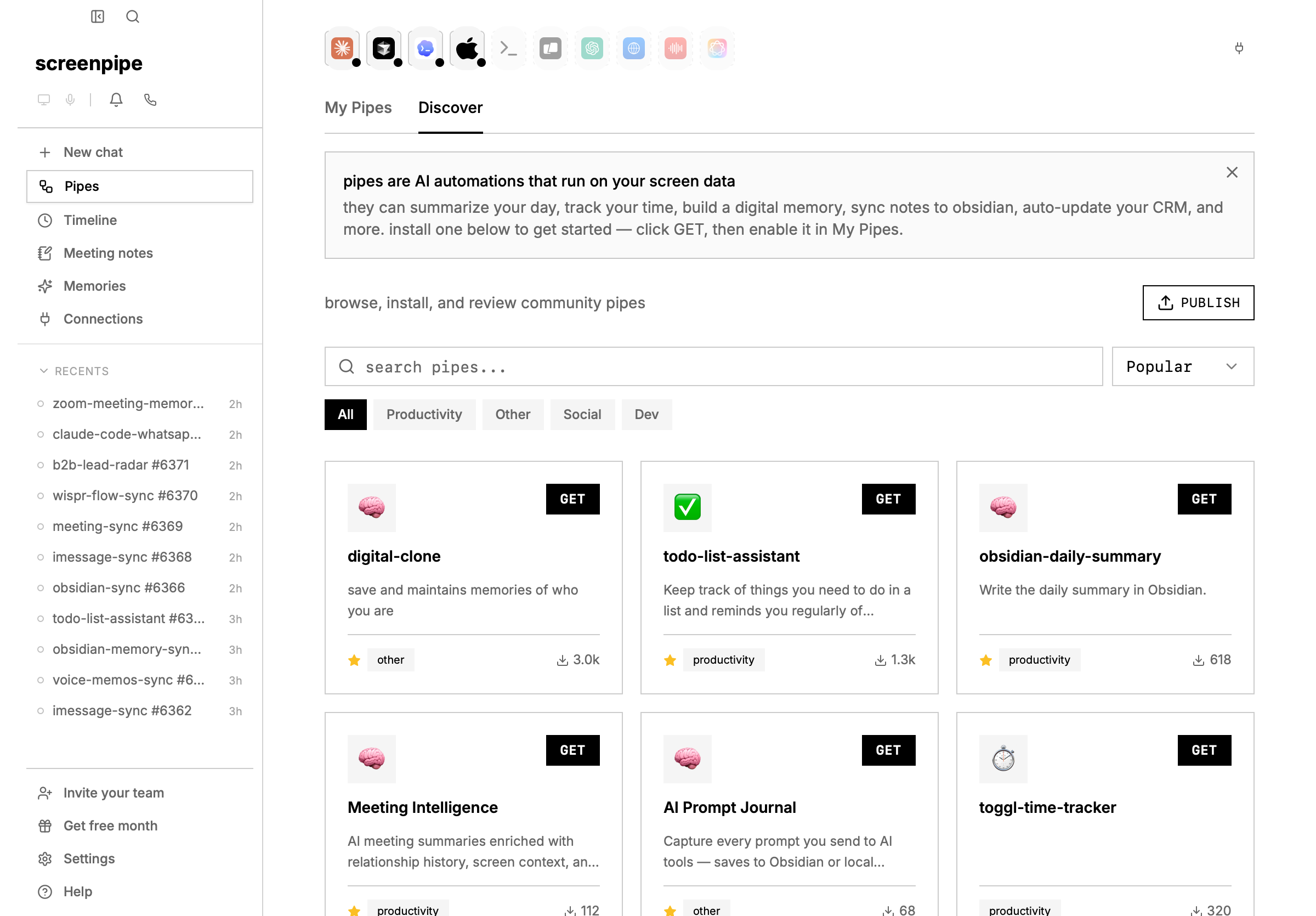
Digital Clone
most popular memory pipesaves and maintains memories of who you are. builds a digital representation of your knowledge, preferences, and patterns over time.best for: personal AI memory, building context that persists across conversations.
Meeting Intelligence
botless meeting memoryAI meeting summaries enriched with relationship history, screen context, and memories — gets smarter over time. goes beyond basic transcription.best for: sales calls, recurring meetings, relationship tracking across conversations.
Obsidian Daily Summary
local notes syncwrites a daily summary of your screen activity directly into your Obsidian vault.best for: daily journaling, building a personal knowledge base, connecting screen context to your notes.
Todo List Assistant
task trackingkeeps track of things you need to do and reminds you regularly of important tasks based on your screen activity.best for: task management, staying on top of action items mentioned in meetings or messages.
AI Prompt Journal
AI workflow journalcaptures every prompt you send to AI tools (ChatGPT, Claude, Gemini, Perplexity, etc.) and saves them to a daily markdown journal.best for: building a searchable archive of your AI conversations, reviewing your thought process.
productivity
Focus Assistant
distraction detectiondetects when you’re distracted based on your active app and sends you a notification to get back on track.best for: deep work sessions, reducing context-switching, staying focused on a specific task.
Toggl Time Tracker
automatic time trackingautomatically tracks your time in Toggl based on which apps you’re using. no manual time entries needed.best for: freelancers, consultants, anyone who bills by the hour.
Notion CRM Sync
sales workflow syncauto-detects business calls and syncs them to your Notion CRM. extracts contacts, company, deal stage, and action items from conversation transcripts.best for: sales teams, founders, anyone tracking deals in Notion.
Personal CRM
relationship memoryremember everyone you meet, what you discussed, and when to follow up. builds relationship context automatically from your screen and audio data.best for: networking, sales, managing relationships across many contacts.
Research Rabbit
research assistantdeep-dives into topics based on your screen activity — finds non-obvious insights you wouldn’t Google yourself.best for: researchers, curious people, discovering connections between topics you’re exploring.
dev tools
Daily Summary of Claude Code Usage
developer workflow summarysummarizes your daily Claude Code usage — what you built, what prompts worked, what didn’t.best for: developers using Claude Code, tracking AI-assisted development patterns.
sync & integrations
iMessage Sync
local message syncsynchronizes your iMessages into the screenpipe database so they’re searchable alongside your screen data.best for: searching old messages, giving AI context about your conversations.
Voice Memos Sync
voice memo memorytranscribes and indexes iPhone Voice Memos synced via iCloud. auto-processes new recordings, transcribes via Deepgram, summarizes with AI, and stores as searchable memories.best for: people who use Voice Memos for quick thoughts, meeting notes, or brainstorming.
WisprFlow Sync
voice note syncsynchronizes WisprFlow notes, recordings, and everything into screenpipe memories.best for: WisprFlow users who want all their voice data searchable in one place.
Apple Photos Sync
photo memory syncreads and syncs all your Apple Photos from iPhone into screenpipe memories.best for: making your photo library searchable by AI, adding visual context to your memory.
social & monitoring
Brand Listening
brand monitoringlistens to topics around your brand on the internet based on your screen activity and notifies you when there’s an opportunity.best for: founders, marketers, anyone monitoring their brand or competitors.
troubleshooting
pipe installed from store but not showing in UI
problem: you click GET on a pipe, the install succeeds, but the pipe doesn’t appear in settings → pipes. solution:- restart screenpipe (close and reopen the app). the pipe list sometimes takes a few seconds to refresh.
- check that the pipe folder exists:
- macOS/Linux:
ls ~/.screenpipe/pipes/and verify the pipe name appears - Windows:
dir %USERPROFILE%\.screenpipe\pipes\(orecho $env:USERPROFILE\.screenpipe\pipesin PowerShell)
- macOS/Linux:
- if the folder is missing, re-run the install from the pipe store.
- verify screenpipe API is healthy:
curl http://localhost:3030/health
pipes disappearing from UI
problem: pipes you installed are suddenly gone, or they appear and then vanish. solution: screenpipe uses a tombstone system to track deleted pipes and prevent them from being restored. a pipe may be marked as deleted if:- you deleted it via settings → pipes → delete
- you uninstalled the app (rebuilding the pipe list removes orphaned pipes)
- the pipe folder was manually deleted from
~/.screenpipe/pipes/
- go to settings → pipes and look for the pipe in the installed list
- if it’s not there, check if it appears in the Discover tab and click GET to reinstall
- if the pipe is still not showing, the tombstone file (
.tombstones.json) may need to be cleared. backup first, then delete~/.screenpipe/pipes/.tombstones.jsonand restart screenpipe
pipe install succeeds but doesn’t execute
problem: the pipe is installed and enabled, but scheduled runs produce no output or logs. solution: the issue is usually the pipe execution, not the installation. see debug screenpipe pipes for execution troubleshooting (logs, API health, provider auth).built-in template pipes
these ship with screenpipe and are available immediately (no install needed):| pipe | what it does |
|---|---|
| Day Recap | summarize accomplishments, key moments, unfinished work |
| Standup Update | generate a copy-paste standup report |
| Time Breakdown | where your time went by app, project, category |
| AI Habits | how you use AI tools — patterns and insights |
| Meeting Summary | summarize meeting transcripts with action items |
| Video Export | create a video clip from your screen recordings |
create your own pipe
a pipe is just one markdown file. you can create a custom pipe for anything — then publish it to the store for others to use.quick way: ask AI to build it
paste this into Claude Code, Cursor, or any AI coding tool:manual way: write it yourself
publishing to the pipe store
ready to share your pipe with the community? visit screenpi.pe/pipes and click Submit a Pipe. you’ll need to provide:- pipe name — what users will see in the store
- description — 1–2 sentences explaining what your pipe does
- icon — a visual thumbnail for the store
- pipe.md source — either paste your markdown directly or link to a GitHub raw file
- tags —
productivity,automation,integration, etc.
what makes pipes powerful
| feature | description |
|---|---|
| zero code | pipes are plain markdown — describe what you want in natural language |
| any schedule | run every 5 minutes, hourly, daily, or on-demand |
| full API access | query screen text, audio, browser URLs, app activity, input events |
| any AI model | use screenpipe cloud, your ChatGPT/Claude subscription, or local Ollama |
| external APIs | pipes can call Slack, Toggl, Notion, Gmail — anything with an API |
| privacy controls | restrict what data a pipe can access with permissions |
| publishable | share your pipes with the community via the pipe store |